The best active recall app in 2026 is the one you will actually open every day. That is the honest answer, and it collapses most of the noise in this category. We tested a dozen tools across medical school prep, language learning, and professional certification, and the ranking below is what survived. If you only care about the algorithm behind the scheduling, jump straight to our spaced repetition app comparison. If you want the underlying science first, our guide to active recall as a study method covers why retrieval practice works before any app enters the picture. This article is about the tools.
Active recall is not a feature; it is a study behavior — the psychology literature calls it the testing effect, and it is one of the most replicated findings in cognitive science. Any app that forces you to produce an answer from memory before showing you the correct one supports active recall. The differences that matter are how well the app schedules those retrieval attempts, how much friction it adds to card creation, and how honest its free tier is — the same question that decides which whole training platforms are worth building on, and one we answer in our list of free tiers that quietly died. Below we rank eight apps on exactly those four dimensions and tell you which one to pick for which situation. If you are assembling a whole study setup rather than one app, our remote learning tool stack places retrieval tools alongside delivery, note capture, and practice.
What "Active Recall App" Actually Means
Search results for "active recall app" surface two very different tool categories, and conflating them wastes a lot of time. The first category is flashcard-based apps — Anki, Quizlet, RemNote, Brainscape, Flashcard Maker — where you see a question, force yourself to produce the answer from memory, and then reveal the correct answer to grade your recall. The second category is note-taking apps with embedded question prompts — Obsidian with plugins, Notion databases, some study planners — where the "active recall" happens through self-generated questions layered on top of your notes.
Both work, but the workflows are radically different. Flashcard apps optimize for repeated retrieval of small, atomic facts on a spaced schedule. Note apps with recall layers optimize for conceptual review during writing. If you are studying for a high- volume factual exam (USMLE, bar exam, AP Human Geography exam prep, language vocabulary, medical anatomy), a flashcard app will beat a note app every time — the scheduler is the point. For boards specifically, our Step 1 carding decisions guide covers which facts justify a card and which do not. If you are synthesizing arguments for a graduate seminar, a note app with recall prompts is often the better fit. Our flashcard study techniques guide covers five evidence-based methods that work in either category.
This article ranks the flashcard-based tools because that is what 90% of searchers mean by "active recall app." If you want the note-app path, our AI study guide maker comparison covers the hybrid workflow instead.
What Makes an App Good for Active Recall
Four things separate a good active recall app from a bad one. Every recommendation below scored well on all four, but no single app tops the list in every dimension.
1. Scheduling quality. A card you got wrong should come back tomorrow. A card you nailed should get pushed out two weeks or two months. The algorithm that decides those intervals is the single most important feature. Modern schedulers use FSRS (Free Spaced Repetition Scheduler), an open-source algorithm that outperforms the older SM-2 that Anki has used since 2006. Apps that ship FSRS by default or as an opt-in should get preference over apps stuck on fixed intervals. Our spaced repetition techniques guide explains why scheduler quality matters more than any other single feature.
2. Card creation friction. The best scheduler in the world is useless if you never build the deck. Apps that let you make a card in under 15 seconds — from a webpage, a PDF, or a keyboard shortcut — win by default because you actually build the deck. Apps that require a template configuration step, a manual export, or a mandatory account signup add friction that kills the habit. See our AI flashcard generator roundup for the apps that automate this step entirely.
3. Cross-platform review. You will not stick with a tool that only works on one device. Web plus mobile is the minimum. A Chrome-first workflow works well for professionals who already live in the browser. A mobile-first workflow works for students who study on commutes. Match the tool to where you actually spend time.
4. Honest free tier. Every recommendation below has a genuinely usable free tier. Apps that gate active recall itself behind a paywall (or add so many ads to the free tier that studying becomes painful) got dropped from the ranking. That test is also why we do not recommend chasing workarounds for paywalled study modes — pick a tool that is honestly free instead.
The 8 Best Active Recall Apps in 2026
Each app was tested with a 500-card deck built over two weeks, reviewed daily on both desktop and mobile where available. Rankings below reflect the scheduler quality, card-creation friction, platform coverage, and free tier honesty described above.
1. Anki — The Gold Standard
Anki has been the reference implementation of active recall software since 2006 and remains the app to beat. It shipped FSRS as an opt-in scheduler in Anki 23.10 and made it easier to enable in 2024, closing the algorithm gap that had been the main criticism from the research community. Desktop is free on Windows, Mac, and Linux, and Android is free too — our review of how AnkiDroid holds up covers the mobile side; iOS costs $24.99 as a one-time purchase that funds development. The shared deck library on AnkiWeb hosts over 10,000 community decks for medical licensing, language vocabulary, and hundreds of other subjects. See our Anki download guide for setup and our what is an Anki deck explainer if you are new. For language learners, our Anki language learning guide covers deck choice and card design.
Best for: serious learners committed to long-term retention. Medical students (see our anatomy flashcards guide), language learners, anyone drilling large volumes of atomic facts. Skip if: you find the interface intimidating and just want to make a deck fast.
2. Flashcard Maker (Chrome Extension) — Lowest-Friction Card Creation
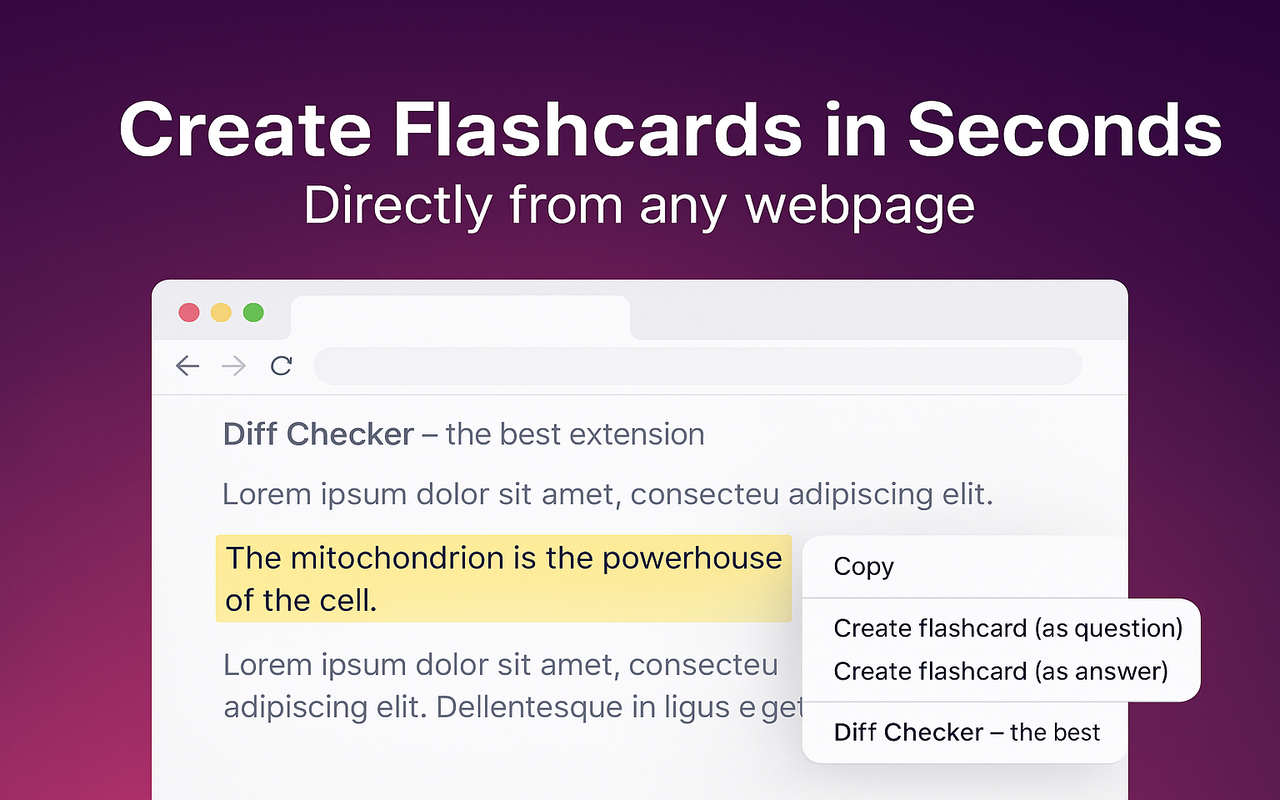
Flashcard Maker is a Chrome extension built for people who read on the web and want to convert what they read into active recall cards without switching apps. Highlight any text on any page, right-click, and choose "Create flashcard (as question)" or "Create flashcard (as answer)." Studying happens in the Chrome side panel, so you never leave your browser tab. Scheduling uses FSRS, so intervals adapt to your actual recall performance card by card. Data lives locally in the browser via IndexedDB, so there is no account and no cloud dependency. If you already use Quizlet, you can import your existing decks via Quizlet TSV or CSV and export back out to Quizlet TSV when you need to.
Best for: web-heavy learners, self-directed adults building decks from articles and documentation, anyone who wants FSRS without the Anki setup cost. Skip if: you need a mobile app or study primarily on your phone during commutes.
3. RemNote — Best Notes-Plus-Flashcards Hybrid
RemNote merges outline-based note-taking with active recall flashcards. You write notes in an outline, mark portions as questions or definitions with special syntax, and RemNote auto-generates flashcards that get scheduled with spaced repetition. This is the workflow of choice for graduate students and knowledge workers who want their study material and their notes to be the same document. AI card generation from PDFs is available on paid tiers.
Best for: graduate students, researchers, anyone whose study material starts as long-form notes. Skip if: you want to build a deck quickly without learning outline syntax first.
4. Brainscape — Best Confidence-Based Scheduling
Brainscape uses a confidence-based rating system — after each card, you rate how well you knew it from 1 to 5, and the app schedules accordingly. It is not FSRS, but the simplicity of the rating system works well for professionals studying for certifications (bar exam, MCAT, real estate licensing, aviation). The card library includes a large collection of professionally curated decks, which matters when you do not want to build your own from scratch.
Best for: certification prep, learners who want curated content more than they want to make their own decks. Skip if: you want FSRS-level algorithmic sophistication or a fully free tier.
5. Quizlet — Easiest Onboarding, Restrictive Free Tier
Quizlet is the most popular flashcard platform in the world with over 60 million monthly active users. The interface is polished, the shared library is massive, and the Learn mode does implement genuine active recall. The catch: many features that used to be free (offline access, unlimited Learn mode, ad-free studying) now require Quizlet Plus at $35.99 per year. The spaced repetition implementation is less sophisticated than Anki or Flashcard Maker. See our Anki vs Quizlet head-to-head or our Quizlet alternatives roundup for the full analysis. Students who want the Quizlet look with a more honest free tier often switch to Knowt — see our Knowt review.
Best for: students with existing Quizlet sets, classroom environments, short-term test prep. Skip if: you want the strongest possible scheduling algorithm or need a fully free experience.
6. Mochi — Best Markdown-First Workflow
Mochi is a flashcard app built around markdown. Every card is a markdown document, decks are folders, and Mochi ships desktop and mobile clients with paid-tier sync. Cloze deletions, code blocks, and images all work natively. The scheduler is a modern implementation of the SM-2 family. If you already write in markdown and want your flashcards to live in the same format, Mochi is a strong pick. The free tier includes unlimited local cards; sync requires the paid tier.
Best for: developers, technical writers, anyone with a markdown- native workflow. Skip if: you do not care about markdown and just want an app that opens fast.
7. Knowt — Best Quizlet Alternative
Knowt started as a Quizlet clone with a fully free feature set and has grown into a serious tool in its own right. Study modes mirror Quizlet's (Learn, Test, Match) and the AI-generated flashcard feature from notes and PDFs is genuinely useful. If your school or study group already lives in Quizlet-style sets and you want to escape the paywall, Knowt is the drop-in replacement.
Best for: Quizlet refugees, high school and college students who want free AI card generation. Skip if: you want FSRS or true long-term retention analytics.
8. AnkiPro — A Warning, Not a Recommendation
AnkiPro is not Anki. It is a separate commercial app that trades on the Anki name. If you install it expecting real Anki, you will end up with a subscription-based alternative that does not sync with real Anki decks. Full details in our is Anki Pro the same as Anki guide. We mention it here so that you install the right app the first time. The real Anki is at ankiweb.net; AnkiMobile ($24.99) is the official iOS app.
Active Recall App Comparison Table
The at-a-glance ranking. Free tier means the app is genuinely usable without paying; "limited" means active recall works but useful features are behind a paywall.
| App | Scheduler | Platform | Free tier | Paid | Best for |
|---|---|---|---|---|---|
| Anki | SM-2 + FSRS opt-in | Desktop, Android, iOS, web sync | Full (desktop & Android) | $24.99 one-time (iOS) | Serious long-term retention |
| Flashcard Maker | FSRS default | Chrome extension (desktop) | Full, no paid tier | — | Browser-based learners |
| RemNote | Modified SM-2 | Web, desktop, mobile | Limited (AI credits capped) | ~$8/mo Pro | Notes + flashcards hybrid |
| Brainscape | Confidence-based | Web, iOS, Android | Limited (deck creation capped) | $7.99/mo Pro | Certification prep |
| Quizlet | Learn mode (basic SR) | Web, iOS, Android | Limited (ads, mode limits) | $35.99/yr Plus | Classroom & social learning |
| Mochi | SM-2 family | Desktop, mobile | Full (local cards only) | ~$5/mo (sync) | Markdown-native workflow |
| Knowt | Learn-mode SR | Web, iOS, Android | Full with AI generation | Optional Pro | Free Quizlet alternative |
Best Free Active Recall App
If free is the primary constraint, three apps stand out. Anki is free on desktop and Android with no feature limits — the only cost is the iOS app, which is one-time, not subscription. Flashcard Maker is fully free as a Chrome extension with FSRS scheduling included; there is no paid tier. And Knowt keeps AI card generation and all core study modes free, funded by ads and an optional subscription.
Between the three, the pick depends on where you study. Desktop or Android? Anki. In the browser? Flashcard Maker. Coming from Quizlet on any platform? Knowt. All three implement genuine active recall, and none of them will pressure you to upgrade to unlock the scheduler. If a "free active recall app" hides retrieval practice behind a paywall, keep looking — that is not a free active recall app, it is a demo.
If you also want printable cards for offline drills (some learners still prefer paper for the first pass), our printable flashcards guide covers that path — but no app on this list requires paper as a supplement.
Best Active Recall Website (No Install)
Search demand for "active recall website" is high because a lot of learners want to try the workflow without installing anything. The web-first active recall apps in 2026 are Quizlet, Knowt, Brainscape, and RemNote — all four run in the browser without a download. Anki has a web version (AnkiWeb) but it is really a sync companion for the desktop app, not a full study environment.
For a true "no install" experience with a modern algorithm, Knowt is the strongest pick — free, browser-native, and the study modes are real active recall (not multiple choice dressed up as review). Brainscape is the second choice if certification prep is your use case. Quizlet works but the free-tier restrictions push you toward Plus faster than the others.
If "no install" means "no separate app" but you are willing to add a browser extension, Flashcard Maker is worth the 30-second install because it removes the card-creation step entirely — you build cards from whatever webpage you are on with a right-click. The extension does not require a login and stores your decks locally in the browser.
Active Recall AI: What Actually Works
"Active recall AI" is the fastest-growing search term in this category and also the most misleading. AI does not do active recall for you — retrieval practice only works when you produce the answer. What AI actually does in these apps is generate the flashcards for you from source material (PDFs, notes, YouTube transcripts, textbook chapters). The retrieval part is still yours. Our AI flashcard generator roundup covers the apps that do this well.
Three things separate good AI card generation from bad. First, the AI should produce atomic cards — one fact per card, not paragraphs of content on both sides. Cards that ask you to recall a wall of text are not real active recall; they are re-reading with extra steps. Second, the AI should preserve context — a card that asks "What year was it founded?" is useless without knowing what "it" refers to. Third, the AI should let you edit before saving — no AI-generated deck is good enough to skip human review.
The apps that hit all three in 2026 are RemNote (paid), Knowt (free with limits), and Mochi (paid). Anki has AnkiHub AI plugins but they require manual setup. Flashcard Maker does not include built-in AI generation; the workflow is highlight-and-save from webpages, which is the manual alternative to AI extraction. If you want the fully automated "paste a PDF, get a deck" experience, RemNote and Knowt are the picks. If you want to review the source material yourself and only create cards for the facts you flag as important, the manual highlight workflow beats AI generation for retention every time — the act of choosing what to card is itself a form of active engagement.
For learners specifically wanting to convert a PDF to an Anki-compatible deck, our PDF to Anki AI guide covers that workflow end to end.
Active Recall Flashcards: How to Build Them
A great app cannot save a bad deck. The single most common reason people give up on active recall is that their cards are too big — front side is a whole concept, back side is a paragraph, and retrieval is impossible. Fix the cards, and any of the apps above will work. Below is the minimum card-design ruleset. For a longer treatment, see our flashcard study techniques deep dive.
One fact per card. If the back of your card has more than one sentence, split it into multiple cards. This is the single highest-impact change you can make to your deck. Instead of "List the four stages of mitosis and describe each one," make four cards: "What is the first stage of mitosis?" / "Prophase. Chromosomes condense." — one per stage.
Force production, not recognition. Multiple choice is not active recall — it is recognition. If the app supports plain question-answer cards, use those. Multiple choice has a place for certification-style test simulation, but the core deck should force you to produce the answer from a blank slate.
Cloze deletions for facts embedded in sentences. Instead of rewriting "Napoleon was defeated at Waterloo in 1815" as a plain Q&A, use a cloze: "Napoleon was defeated at [...] in 1815." Then a second card: "Napoleon was defeated at Waterloo in [...]." Two cards, two retrieval attempts, minimal card-creation effort.
Use images for spatial and visual facts. Anatomy, geography, chemical structures — anything visual should have an image on at least one side of the card. Our anatomy flashcards guide covers image-based card design in detail.
How to Choose Your Active Recall App
A short decision path based on the situation, not the marketing copy.
You want the strongest possible algorithm and are willing to spend an hour on setup. Pick Anki with FSRS enabled. It is free on desktop and Android and remains the most powerful active recall app in existence.
You read on the web and want to build cards from what you read. Pick Flashcard Maker. The right-click card creation removes the single biggest source of friction (leaving your reading context to build a deck), and FSRS is included by default. Install from the Chrome Web Store.
Your notes and your flashcards should be the same document. Pick RemNote. The outline-with-cloze workflow is unique to this app and hard to replicate elsewhere.
You are studying for a professional certification with a known curriculum. Pick Brainscape. The curated deck library covers most major professional exams, and the confidence-based rating is well matched to the "how sure am I about this fact?" question that certification prep keeps asking.
You already have Quizlet decks and just want to keep using them. Stick with Quizlet or migrate to Knowt. See our Quizlet alternatives guide for the full migration playbook.
Getting Started in 15 Minutes
Pick one app from the section above and open it now. Do not spend another hour researching. The active recall app you actually use will beat the theoretically optimal app you never open. Fifteen minutes from now, you should have:
Minutes 0–5: install the app. If it is Flashcard Maker, install the Chrome extension and pin it to your toolbar. If it is Anki, download from ankiweb.net and open the desktop app. If it is a web app (Quizlet, Knowt, Brainscape, RemNote), sign up and dismiss any onboarding tour.
Minutes 5–12: build 10 cards. Just 10. Do not try to build a 500-card deck on day one. Pick a subject you are actively learning right now, and make 10 atomic question-answer cards. If you are using Flashcard Maker, this means opening a webpage on your topic, highlighting 10 facts, and right-clicking each one. If you are using Anki, this means clicking "Add" 10 times.
Minutes 12–15: do the first review. The app will show you each card, you will produce the answer from memory, and you will grade yourself. This is the entire loop. Come back tomorrow and do it again. On day 2 the app will show you fewer cards because some will already be "easy" and pushed out to day 4 or day 7. That is spaced repetition working.
Ninety percent of active recall failures are people who researched apps for a week and never built a single deck. The other ten percent are people who built a 1,000-card deck on day one and burned out on day three. Ten cards, every day, for two weeks. Then decide whether the app is right for you. If you want a broader entry point, our best flashcard app guide covers the same tools from a different angle.
Frequently Asked Questions
What is the best active recall app in 2026?
Anki remains the strongest overall for scheduling quality and long-term retention, but it has the highest learning curve. Flashcard Maker is the strongest pick for browser-based learners because it removes the card-creation step and includes FSRS by default. RemNote wins for the notes-plus-flashcards hybrid workflow. Free apps that support real active recall (not just paywalled demos) include Anki, Flashcard Maker, and Knowt.
Is there a free active recall app?
Yes. Anki is free on desktop (Windows, Mac, Linux) and Android with no feature limits. Flashcard Maker is a fully free Chrome extension with FSRS scheduling and no paid tier. Knowt is free with ads and AI card generation included. All three implement genuine retrieval practice, not multiple choice dressed up as active recall.
What is the best active recall website that requires no install?
Knowt is the strongest browser-native pick — free, real active recall study modes, and AI card generation from notes. Quizlet works but the free-tier restrictions push you toward the $35.99/year Plus plan faster than competitors. Brainscape is best if you want curated certification-prep decks in the browser.
What is active recall AI, and does it actually work?
AI in this category generates flashcards for you from source material (PDFs, notes, transcripts). It does not perform retrieval on your behalf — you still have to produce the answer from memory. Good AI card generation makes atomic cards (one fact per card), preserves context, and lets you edit before saving. RemNote, Knowt, and Mochi implement this well in 2026.
Anki vs Quizlet: which is better for active recall?
Anki. Its scheduling algorithm (SM-2 by default, FSRS opt-in) is more sophisticated than Quizlet's Learn mode, and Anki does not restrict active recall to a paid tier. Quizlet has a better interface and a larger shared deck library, but for pure retrieval-practice quality Anki wins. See our Anki vs Quizlet full comparison for the detailed breakdown.
Start Active Recall in Under 60 Seconds
Flashcard Maker turns any webpage into a spaced-repetition deck with a right- click. Free Chrome extension, FSRS scheduling, works offline, no account.
Add to Chrome →